GoPixel WP Admin Studio & Toolkit (v1.3.8 Beta)

Glassmorphism admin design, printf-safe White Label branding, role-based menu visibility (now covering GoPixel Studio menus with lockout protection), visual CPTs & Custom Fields, 2FA, country firewall, Redis caching, and config-preserving exports.

Version: 1.3.8 (Public Beta) Premium · ₹0 During Public Beta WP 6.0+ (Tested to 7.1) · PHP 7.4+ Staging Only · No Redistribution
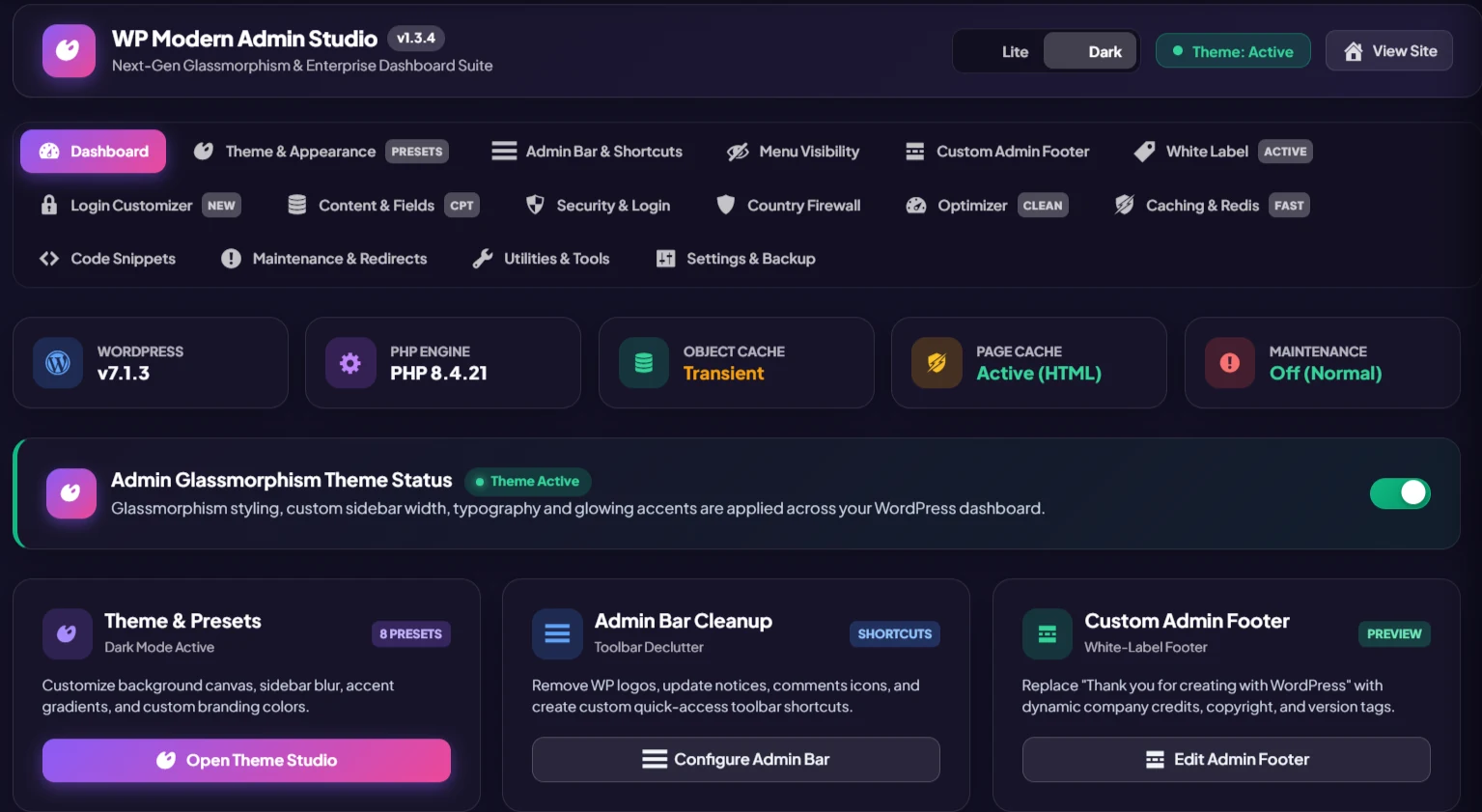
Real GoPixel WP Modern Admin Studio WordPress dashboard capture showing Lite/Dark toggle, White Label, Country Firewall, CPTs, Caching, and Snippets tabs
Actual WordPress Admin Capture: Unified Studio dashboard showing Lite/Dark mode switch, environment cards (WordPress 7.1.3 / PHP 8.4), White Label, Country Firewall, Caching, and Code Snippets tabs.

One Toolkit to Redesign, White-Label, Secure & Accelerate wp-admin

Agencies, developers, and WordPress teams often maintain half a dozen separate plugins for white-label dashboards, menu hiding, custom post types, login URL cloaking, bloat cleanup, code snippets, country blocking, and Redis caching. GoPixel Admin Studio v1.3.8 unifies the entire workspace under one modular dashboard backed by safer opt-in defaults, Studio menu lockout protection, and printf-safe White Label branding.

New installations keep high-impact switches—such as demo CPTs, brute-force lockouts, SVG uploads, Redis/page caching, and the master White Label toggle—switched off until you enable only what each project requires.

Glassmorphism Dark & Light Opt-In White Label Role Menu Visibility CPTs, Fields & [mwp_option] 2FA & Country Firewall CSS/SCSS/JS/HTML/PHP Snippets Redis & Page Cache Config-Preserving Exports

Real Captures From GoPixel Admin Studio (v1.3.8)

Actual captures from the WordPress admin workspace showing module cards plus Light and Dark navigation presets.

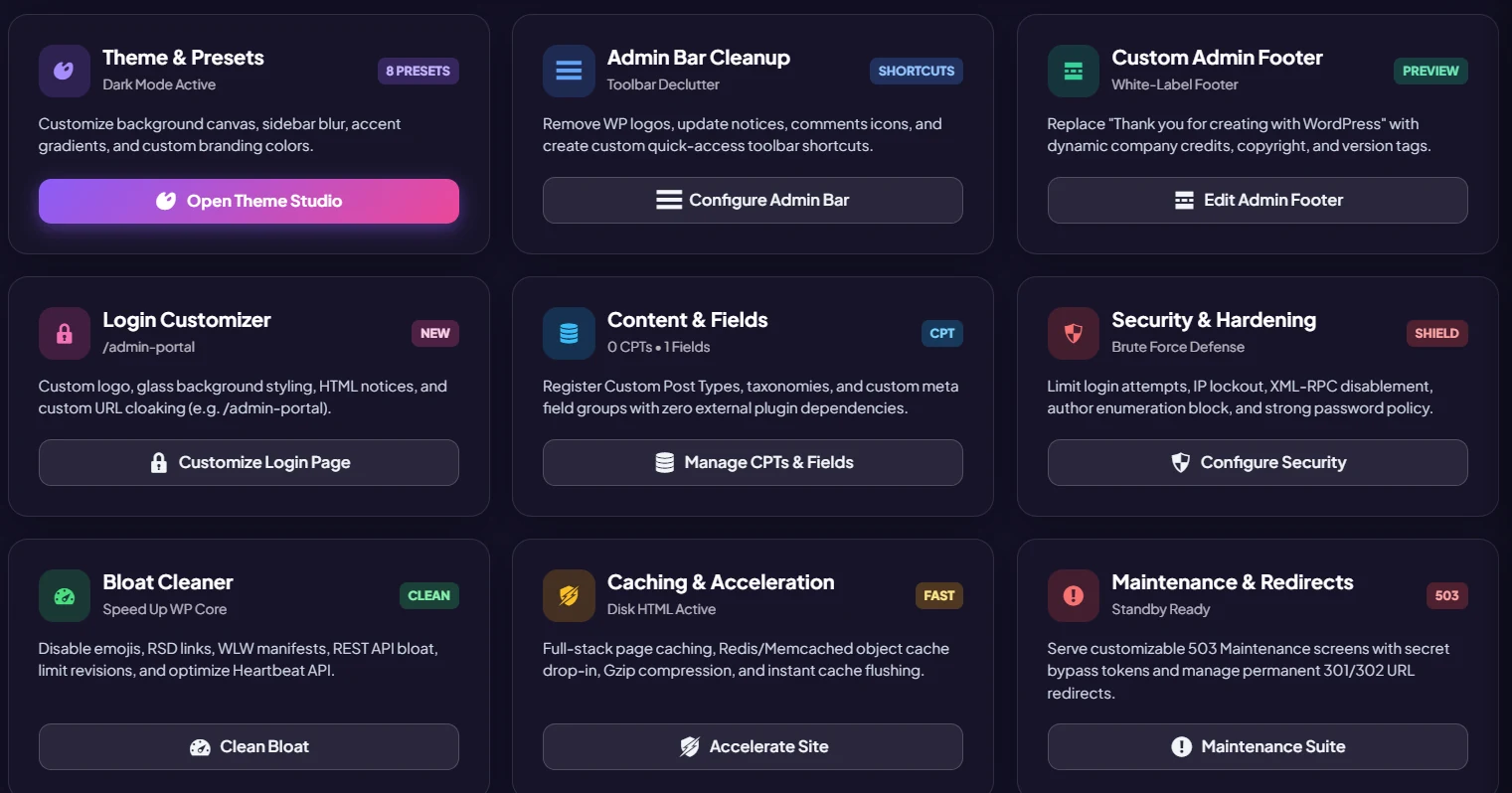
GoPixel Admin Studio feature cards showing Theme Presets, Admin Bar Cleanup, Login Customizer, Content & Fields, Security, Bloat Cleaner, Caching, and Maintenance cards
Purpose-Built Studio Cards: Launch Theme Presets (8 presets), Admin Bar Cleanup, Custom Footer, Login Customizer (/admin-portal), CPTs & Fields, Security, Bloat Cleaner, Caching, and HTTP 503 Maintenance from focused cards.
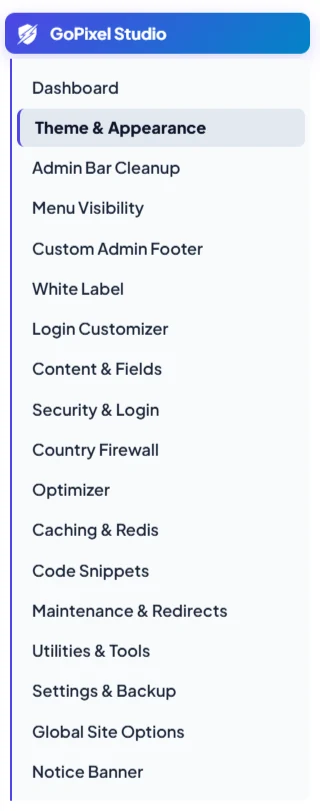
GoPixel Studio navigation in Light mode listing all 18 Studio areas including White Label, Country Firewall, Global Site Options, and Notice Banner
Light Mode Navigation: Clean sidebar menu covering White Label, Country Firewall, Global Site Options & Notice Banner.
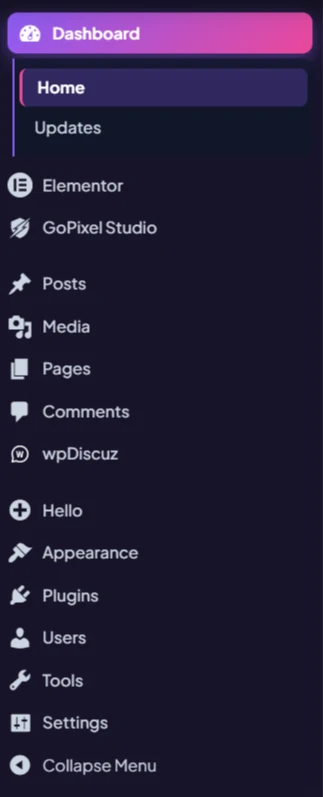
WordPress admin sidebar in Dark glassmorphism mode alongside Elementor, Posts, Media, Pages, and GoPixel Studio
Dark Glassmorphism Sidebar: Integrates smoothly alongside native WordPress menus and builders like Elementor.

Every Capability Included in GoPixel Admin Studio v1.3.8

Updated through v1.3.8 with Studio menu visibility & lockout guards, printf-safe White Label wording, Country Firewall, safer defaults, clean uninstall, and configuration-preserving ZIP exports.

Studio Module Included Capabilities in v1.3.8
01 · Admin Theme & Appearance Glassmorphism dashboard; contrast-conscious Light and Dark modes (with v1.3.1 Welcome banner & v1.3.2 Upload Plugin dark-mode fixes); 8 preset palettes; primary & accent colors; blur, opacity, and border controls; adjustable sidebar width up to 300px; viewport-aware anti-bounce submenu flyouts (v1.3.3–v1.3.4).
02 · White Label Suite (v1.3.0+, Opt-In) Disabled by default via master toggle; independent switches to replace or hide admin-bar logo, remove WordPress.org links, customize footer credit & WP version visibility, rebrand browser tab titles, customize login branding & hide login links/language switcher, hide selected dashboard widgets, hide Updates menu for non-admins, customize email sender name, replace selected wording (skipping strings with printf placeholders since v1.3.7 so percent signs never trigger fatal errors), and rename the Studio menu.
03 · Admin Bar, Footer & Notice Banner Remove WP logo, update count, comments, new-content, Howdy greeting, Screen Options & Help tab; role-based frontend toolbar visibility; add custom admin-bar shortcut links; white-label dynamic footer; sort active plugins first; optional bell-style Admin Notices Drawer.
04 · Role-Based Menu Visibility (Updated v1.3.8) Hide or show top-level admin menu items and submenus per role using hide-from-roles or only-show-to-roles rules (including custom user roles). Now lists the GoPixel Studio menu and its submenus to hide the plugin from other roles, while blocking hiding Studio from your own role (warning shown in both the rules list and toggles board) and guaranteeing administrators always keep access.
05 · Login Customizer Custom login URL slug (e.g., /admin-portal) and optional 404 response for default wp-login.php requests (with WooCommerce settings compatibility); custom logo, glass background styling, HTML notices, headings & titles (demo external URLs removed in v1.3.5).
06 · Custom Content, Fields & Global Options Visual Custom Post Types (CPTs) & Taxonomies (labels, visibility, archives, REST exposure, hierarchy, supports); Custom Field Groups; Global Options Pages read via [mwp_option] shortcode or get_option() (mwp_opt_ prefix); documented integrations for Bricks, Breakdance, Oxygen, Elementor, WPML & TranslatePress; authenticated REST endpoint (GET /wp-json/modern-wp/v1/fields/<post_id>); content duplication & drag-and-drop ordering.
07 · Security & Login Hardening Failed-login brute-force lockout (IP/username); Two-Factor Authentication (2FA module with configurable methods & role enforcement); password-strength policies; login identifier restriction; role-based login/logout redirects; XML-RPC blocking; author archive & public metadata exposure controls (all opt-in since v1.3.5).
08 · Country Firewall Country blocklist or allowlist mode with custom HTTP 403 block message; Cloudflare country-header support with HTTPS-first geolocation fallback; exempts logged-in users and administrative/automation contexts while failing open on unknown lookups.
09 · Optimizer & Bloat Cleaner Selectively disable feeds, embeds, emojis, frontend Dashicons, jQuery Migrate, RSD, WLW manifest, shortlinks, generator meta, version query strings, anonymous REST endpoints, comments, author archives, built-in file editor & Heartbeat frequency.
10 · Caching & Redis Acceleration Disk HTML page cache with TTL, gzip compression, mobile vary & browser cache headers; logged-in, cart & maintenance bypasses; LiteSpeed, Cloudflare & Varnish purge hooks; safe object-cache.php drop-in for Redis, Memcached, APCu & Disk using WP_REDIS_PASSWORD and ownership markers that never overwrite host drop-ins.
11 · Code Snippets Manager Manage CSS, SCSS, JavaScript, HTML, and PHP snippets with enablement toggles and placement rules, plus virtual robots.txt, ads.txt, custom head/footer blocks & body classes. (Starts empty on fresh v1.3.5+ installs; only add trusted code and maintain verified staging backups before using PHP snippets.)
12 · Maintenance & Redirects Customizable HTTP 503 Maintenance screen with bypass tokens and exclusion patterns; 301/302/307/308 Redirect Manager with pattern matching and optional 404 fallback redirect.
13 · Media, Utilities & Clean Uninstall Media-library infinite scroll; permission-checked post duplication; optional SVG & AVIF uploads (SVG disabled by default since v1.3.5 with unsafe markup rejection); At-a-Glance server panel; clean uninstall (v1.3.5+) removing plugin-owned options, transients, cache files, and managed drop-ins while preserving posts & user content.
14 · Config-Preserving Exports & Settings (v1.3.6+) Generate export ZIPs that preserve your configured CPTs, taxonomies, field groups, options pages, snippets, redirects, custom code, and saved settings—reporting the actual generated file count inside the export modal alongside full JSON export/import.

Changelog Through v1.3.8 & Developer Safeguards

🛡️

v1.3.8 Studio Menu Lockout Guard

Admin Menu Visibility now includes the GoPixel Studio menu and its submenus so you can hide the plugin from non-admin roles, while blocking hiding it from your own role (with rules-list and toggles-board warnings) and keeping administrator access intact.

🏷️

v1.3.7 Printf-Safe White Label

Fixed a fatal "Unknown format specifier" dashboard crash in White Label's "Replace WordPress in core admin wording" when brand names held a percent sign—branding now leaves strings containing printf placeholders untouched.

✓

Recommended Staging Test Flow

Clone site to staging → Verify DB + file backup → Upload gopixel-wp-admin-studio-1.3.8.zip (WP 6.0+, PHP 7.4+) → Test Dark/Light UI & White Label → Verify Studio role-menu rules, Country Firewall, snippets, caching, and ZIP exports.

Complete Changelog (v1.0.0 – v1.3.8)

Version Release Highlights
v1.3.8 New: Admin Menu Visibility now lists the GoPixel Studio menu and its submenus so you can hide the plugin from other roles. Fixed: Hiding the GoPixel Studio menu from your own role is blocked to prevent lockouts, showing a warning in both the rules list and toggles board while administrators always retain access.
v1.3.7 Fixed: White Label "Replace WordPress in core admin wording" could crash the admin dashboard with a fatal Unknown format specifier error when the brand name contained a percent sign (%); branding no longer rewrites strings containing printf placeholders, leaving WordPress core format strings intact.
v1.3.6 Fixed generated ZIP exports so saved builder configuration is retained (CPTs, taxonomies, field groups, options pages, snippets, redirects, custom code & saved settings); export modal now displays the actual generated file count.
v1.3.5 Safer opt-in defaults on new installs (no demo CPTs/snippets, security/caching/SVG uploads off until enabled, empty default robots/ads/custom-code fields, removed demo external login images); stricter SVG rejection; per-post duplication capability check; HTTPS-first country geolocation; clean uninstall cleanup for plugin options, transients, cache files & managed drop-in.
v1.3.3 – v1.3.4 Stabilized Settings and Tools admin menu flyouts; locked flyout margins against WordPress core submenu adjustments; computed placement cleanly on open with improved natural-height measurement and cleanup.
v1.3.1 – v1.3.2 Matched Upload Plugin screen to Dark mode for readable ZIP filenames and visible Install Now button; fixed Light-mode Welcome banner contrast and prevented dark background artwork bleed.
v1.3.0 Added optional opt-in White Label module (disabled by default via master toggle) with independent switches for admin bar, WordPress.org links, footer, browser titles, login screen, dashboard widgets, non-admin Updates menu, email sender name, wording & Studio menu rename.
v1.0.0 – v1.1.0 Introduced glassmorphism dashboard, visual CPT & custom field builder, protected REST endpoint, login cloaking, bloat cleaner, disk/Redis object caching, maintenance mode, and hover-intent navigation.
Public Beta v1.3.8 · Free Testing Download

Download GoPixel Admin Studio v1.3.8 (Testing Only)

Download gopixel-wp-admin-studio-1.3.8.zip from the official GoPixel Admin Studio GitHub repository (₹0 during Public Beta). By downloading, you confirm this build will be used strictly on local/staging WordPress sites (not production) and that redistribution is strictly forbidden.

Download v1.3.8 Beta on GitHub ↗ Staging/testing only · No production use · No redistribution

Optional — Register Your Staging Test or Report Beta Feedback:

Instant download link + tester changelog updates

GoPixel Admin Studio v1.3.8 Beta FAQs

Version 1.3.8 adds the GoPixel Studio menu and its submenus to Admin Menu Visibility so you can hide the plugin from other roles, while blocking hiding Studio from your own role (with warnings in the rules list and toggles board, and guaranteed administrator access). Version 1.3.7 prevents fatal Unknown format specifier dashboard errors in White Label wording replacement by skipping strings containing printf placeholders.

The White Label module has a master switch that starts disabled by default, alongside independent toggles for admin-bar branding, WordPress.org links, custom footer credit and version visibility, browser titles, login screen branding, email sender name, selected dashboard widgets, and renaming the Studio menu—without rewriting strings that contain printf placeholders.

No. Since v1.3.5, new installations start with safer opt-in defaults: demo structures are not auto-created, and brute-force lockout, password policy, XML-RPC blocking, caching, Redis toggles, and SVG uploads stay off until explicitly enabled.

No. During GoPixel's public beta program, v1.3.8 is provided free strictly for local or staging testing only and must never be activated on a production website, ecommerce store, or client property. Redistribution or sharing of the beta package is strictly forbidden.

Pair Admin Studio with Modular WordPress SEO

Call Now WhatsApp